
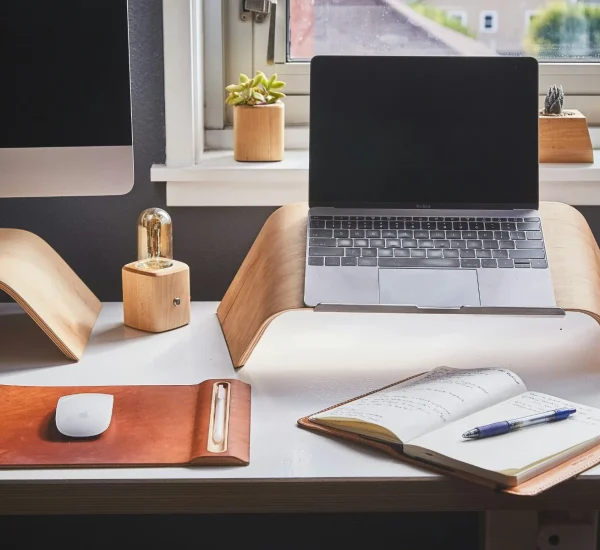
A distracting home office does not announce itself as a problem. It hides in the chair that makes your back ache at 2 p.m., the cluttered corner that keeps pulling your eye away, and the dining table setup that quietly tells your brain work is temporary. Strong home office ideas matter because most Americans working from home are not fighting laziness; they are fighting rooms that were never designed to protect attention. A home can support deep work, but only when the space stops competing with the job itself. That shift begins with treating your work area as a real environment, not leftover square footage. For anyone building a better daily rhythm, even outside resources from a trusted digital publishing network can help frame how small improvements shape bigger outcomes. The goal is not to create a showroom office. The goal is to build a place where your brain recognizes the signal: when you sit here, you work with less friction.
Home Office Ideas That Make Attention Easier to Keep
A strong work area begins before you buy anything. The first decision is not the desk, the chair, or the lamp; it is the purpose of the space. Many American homes have an office corner that looks acceptable but works poorly because it lacks a clear job. A laptop sits near mail, school papers, snacks, and charging cords, so the brain receives mixed signals all day. The better move is to design the space around one question: what makes attention easier to start and harder to break?
How to Choose a Quiet Work Zone Without Needing a Spare Room
A dedicated room helps, but it is not the only path to a productive home office setup. A corner of a bedroom, a wide hallway landing, or the end of a living room can work when the boundaries are clear. The mistake is choosing the most convenient spot instead of the least disruptive one. A kitchen table may have surface area, but it also carries the noise of meals, dishes, packages, and family movement.
A better home office setup starts with traffic patterns. Sit for five minutes in the spot you are considering and notice what crosses your line of sight. If you see the television, front door, laundry pile, or refrigerator, your focus will pay a small tax every few minutes. That tax adds up. The best place is often not the prettiest corner, but the one with the fewest interruptions.
Sound matters as much as sight. In a busy U.S. household, remote work productivity often depends on reducing random noise rather than creating silence. A bookshelf, rug, curtain, or fabric panel can soften echo without turning your home into a recording studio. Noise-canceling headphones help, but the room should still do some of the work.
Why Visual Boundaries Matter More Than Square Footage
A small work zone can outperform a large messy room because the brain loves clear cues. When your desk faces a blank wall, a window with a calm view, or a simple shelf, your attention has fewer exits. When it faces household motion, your mind keeps checking the room like a security camera.
Workspace organization plays a bigger role here than most people admit. The top of your desk should show only what belongs to the current work session: computer, notebook, water, and maybe one tool tied to the task. Everything else becomes a silent invitation to drift. That does not mean sterile. It means selective.
The counterintuitive part is that comfort can weaken focus when it turns the office into a lounge. A plush chair, dim lighting, and soft blanket may feel pleasant, but they often tell your body to slow down. Your office should feel calm, not sleepy. The best visual boundary says, “This is where I think,” not “This is where I escape.”
Build a Desk Setup That Supports Real Work
Once the space has a role, the desk becomes more than furniture. It becomes the control panel for your day. A weak desk setup creates small decisions all morning: where to put papers, where the charger went, why the screen feels too low, why your shoulders feel tight. A stronger setup removes those decisions before they reach your attention. That is where good design gets practical.
Desk Ergonomics That Protect Energy Through the Afternoon
Desk ergonomics is not about chasing a perfect posture diagram. It is about reducing the strain that steals mental energy while you work. Your screen should sit near eye level, your elbows should rest close to your body, and your feet should land flat or on a stable footrest. These basics sound boring until you feel the difference after six hours.
Many people blame afternoon brain fog on motivation, but the body often starts the rebellion first. A laptop screen that sits too low pulls your neck forward. A chair that lacks support makes your hips tighten. A desk that is too high lifts your shoulders. None of these problems feels dramatic at 9 a.m.; by 3 p.m., they own the room.
A simple fix can be enough. Raise a laptop with a stand or stacked books, then use a separate keyboard and mouse. Adjust your chair so your arms do not reach upward. The Occupational Safety and Health Administration offers helpful guidance on computer workstations, and the core idea is plain: your tools should fit your body, not force your body to adapt all day.
Lighting Choices That Change How Work Feels
Light shapes mood before you notice it. A dim room makes work feel heavier, while harsh overhead light can tire your eyes faster than the task itself. The best home lighting mixes natural light, a desk lamp, and reduced screen glare. That balance helps the room feel alert without feeling clinical.
Remote work productivity often improves when lighting changes across the day. Morning light near a window can help signal the start of work, while a warmer lamp later in the afternoon keeps the space usable without feeling intense. If your desk faces a window, glare may become a hidden problem. Turn the desk slightly or use sheer curtains so the window supports focus instead of fighting the screen.
Desk ergonomics also connects to lighting because posture changes when you cannot see well. People lean forward when the screen is too dim, twist when shadows hit paperwork, and squint when glare cuts across the monitor. Better lighting is not decoration. It is attention support with a power cord.
Use Organization Systems That Reduce Daily Friction
A clean office is not the same as an organized one. Some spotless desks fail because everything useful is hidden in a drawer, while some active desks work well because every item has a reason to be there. The purpose of organization is not visual perfection. It is fewer repeated decisions. When your work tools return to the same place every day, your morning starts with momentum instead of a search party.
Workspace Organization for Papers, Cords, and Daily Tools
Workspace organization should begin with the items that interrupt you most often. For many people, that means papers, chargers, sticky notes, pens, headphones, and random receipts. These small objects become annoying because they arrive one at a time. By Friday, the desk looks like a week of unfinished thoughts.
A simple tray system solves more than it should. Use one tray for active papers, one folder for records, and one small container for tools you touch daily. Cords need the same discipline. A charging cable clipped to the desk edge saves you from crawling under the table during a meeting. Tiny fixes matter when they remove repeat irritation.
The unexpected truth is that hiding everything can make the space worse. If you put daily tools too far away, you create friction every time you need them. Keep frequent-use items within arm’s reach and move low-use items out of the work zone. Organization works when it respects behavior, not when it copies a catalog photo.
How to Keep Clutter From Becoming Background Noise
Clutter rarely ruins focus in one dramatic moment. It wears you down by asking for attention in the background. A bill reminds you to pay it. A package reminds you to return it. A notebook reminds you of a half-finished idea from last week. Your eyes keep touching these objects, and each touch pulls a thread from your concentration.
The fix is a closing ritual, not a once-a-month cleaning spree. Spend five minutes at the end of the workday resetting the desk, writing tomorrow’s first task, and removing anything unrelated to work. This small routine tells your brain the day is finished. It also protects the next morning from yesterday’s mess.
Home Office Ideas can fail when they focus only on buying better things instead of building better habits. A premium chair cannot save a desk covered in unresolved decisions. A beautiful shelf will not help if it becomes a museum for delayed chores. The room needs rules that match real life, and those rules should be simple enough to follow when you are tired.
Shape Habits Around the Room So Focus Lasts
The room can support focus, but it cannot carry the whole burden. Work from home blurs the line between personal time and job time, especially in U.S. households where space, schedules, and family needs overlap. A good office setup creates signals. Strong habits teach your brain how to respond to those signals. Together, they turn a corner of your home into a place where work begins with less resistance.
Routines That Mark the Start and End of Work
A start routine does not need drama. It needs repetition. Make coffee, open the blinds, put your phone in one chosen place, review the first task, and begin. The sequence matters because it removes negotiation. You stop asking whether you feel ready and begin acting like work has already started.
Remote work productivity depends on this kind of ritual because home has too many competing identities. The same room may hold bills, hobbies, pets, kids, laundry, and your job. Without a clear start signal, your brain keeps switching channels. A routine gives the day a front door.
The end routine matters even more for people who struggle to stop working. Close tabs, write a short note for tomorrow, clear the desk, and shut down the computer if possible. Leaving the office in a finished state protects your evening. It also prevents work from leaking into every quiet moment at home.
Personal Touches That Help Without Distracting
Personality belongs in a home office, but it needs restraint. A framed photo, a plant, a favorite mug, or a piece of art can make the space feel owned. Too many personal items, though, turn the office into a memory wall. Focus needs warmth, not clutter wearing a sentimental disguise.
A productive home office setup should include objects that support the kind of worker you want to be. A plant can remind you to look away from the screen. A whiteboard can hold the week’s priorities. A small clock can keep meetings from swallowing the day. Each item should earn its spot through function, mood, or both.
The best personal touch may be the one nobody sees on a video call. It might be a drawer with index cards, a lamp that makes late work feel less harsh, or a chair mat that stops the floor from fighting you. Your office does not need to impress anyone. It needs to help you return to the work after life interrupts, because life will interrupt.
Conclusion
A better home office starts with honesty about what actually breaks your attention. It is rarely one giant problem. It is the chair that drains you, the light that dulls the room, the clutter that keeps whispering, and the missing boundary that lets work and home trip over each other. Fixing those issues does not require a perfect room or a large budget. It requires choices that reduce friction every day. Home Office Ideas work best when they make your space easier to use on an ordinary Tuesday, not only when everything is clean and quiet. Start with one change that removes a daily annoyance: raise the screen, move the desk, clear the paper pile, or create a five-minute shutdown routine. Then let the room teach your brain a new pattern. Build the space around the focus you want, and your workday will stop feeling like a fight against your own house.
Frequently Asked Questions
What are the best home office setup ideas for small spaces?
Choose a low-traffic corner, face the desk away from household distractions, and use vertical storage instead of wide furniture. A small home office setup works well when every item has a job and the space sends a clear work signal.
How can I improve remote work productivity at home?
Start with a repeatable morning routine, reduce visual clutter, and keep your first task visible before the day begins. Remote work productivity improves when your environment removes small decisions instead of adding more choices to your schedule.
What desk ergonomics changes should I make first?
Raise your screen to eye level, keep your elbows close to your body, and place your feet flat on the floor or on a footrest. Desk ergonomics works best when it reduces strain before pain forces you to notice it.
How do I create workspace organization that lasts?
Build around your real habits instead of an ideal version of yourself. Keep daily tools close, move rare-use items away, and reset your desk at the end of each workday so clutter cannot rebuild without resistance.
What home office lighting is best for focus?
Use natural light when possible, then add a desk lamp that brightens the work surface without causing screen glare. Good lighting should make the room feel alert, comfortable, and easy to work in for long stretches.
How can I make a home office feel professional without spending much?
Reposition your desk, clean the background behind your video calls, improve lighting, and remove unrelated items from view. Professional does not have to mean expensive; it means the space looks intentional and supports serious work.
What should I keep on my desk for better work focus?
Keep only the items tied to your current work: computer, notebook, pen, water, and one or two task-specific tools. A desk with fewer visual demands gives your attention less to fight during deep work.
How do I separate work and home life in the same room?
Use clear start and end routines, shut down your computer when possible, and reset the desk after work. Even in a shared room, repeated signals help your brain recognize when work begins and when it is done.